Windows users, update Globus Connect Personal for long-path support.
On Windows, most operations on files have a limitation known as “MAX_PATH”:
Windows paths have a long-standing maximum length of 260 characters, measured
from the start of the path (C:\, D:\, etc.), up to and including the file
extension.
Most users do not encounter problems with MAX_PATH limits. But for folks working with large data sets—particularly in areas like genomics—you may have experenced MAX_PATH issues.
In Globus, MAX_PATH issues do not show up directly in error messages. Instead, Globus will report file-not-found, not-a-directory, or checksum-failed errors. In all cases, the file path will be very long, indicating the problem is likely due to the MAX_PATH limit.
As of Globus Connect Personal 3.2.7, this limit can now be increased, supporting paths up to 4,096 characters in length. To enable long-path support, do two things:
First, Upgrade Globus Connect Personal. Right-click on the Globus toolbar icon, and select “Check for Updates”. If 3.2.7 is not installed, you will be prompted to upgrade.
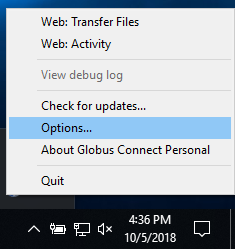
Globus Connect Personal toolbar pop-up
Next, follow the instructions to configure your machine for long-path support.